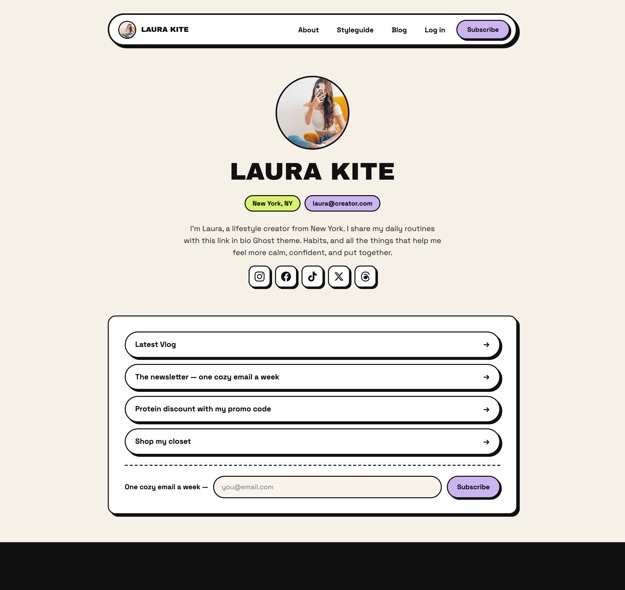
Link in Bio Ghost Theme

A rented link page works right up until it doesn't. Kite puts the newsletter, shop, guest appearances and brand partnerships on one page you own — on your domain, with your member list — in any of 12 visual styles.

Who Kite suits

  • Creators and influencers who have outgrown a hosted link page
  • Anyone collecting email addresses they want to actually own
  • People with several income streams — newsletter, shop, sponsorships, appearances
  • Personal brands who need the page to look like theirs, not like a template
  • Anyone already on Ghost who wants a stronger front door

When to look elsewhere

  • Only need three buttons and no website? A hosted link service is genuinely simpler and cheaper.
  • The newsletter is the whole product? Macaw and Beak are built for that.
  • Publishing episodes? Siskin has the audio player.
  • Running a multi-author publication? Heron is the magazine theme.

Owning the page instead of renting it

Being fair about this: a hosted link service is easier to start with. The trade is what happens later.

The domain and the list are yours

A hosted link page lives on someone else's domain, and the email addresses it collects usually live in their database. On Ghost the domain is yours, the members are in your install, and you can export and leave whenever you want.

The page can actually sell

Kite has newsletter subscribe sections, a shop section for affiliate and product picks, and a "work with me" section for brand partnerships — the things a creator earns from, rather than a stack of identical buttons.

It doubles as a real website

Because it is Ghost underneath, the same install gives you posts, tags, author pages and paid memberships. The link page is the front door, not the whole building.

Where the trade goes the other way

You need a Ghost site and a few hours to set it up, and you are responsible for it afterwards. If you want a link page working in ten minutes and nothing more, take the hosted option — that is the honest answer.

Version 1.0.0 · Ghost 6

Kite

A link in bio Ghost theme for creators, influencers and personal brands. The homepage is a profile introduction followed by the sections you choose to switch on — newsletter, latest video, guest appearances, shop, "life lately" micro-updates and "work with me".

It is our newest theme, released July 2026, and includes a styleguide page showing how every Ghost editor card looks.
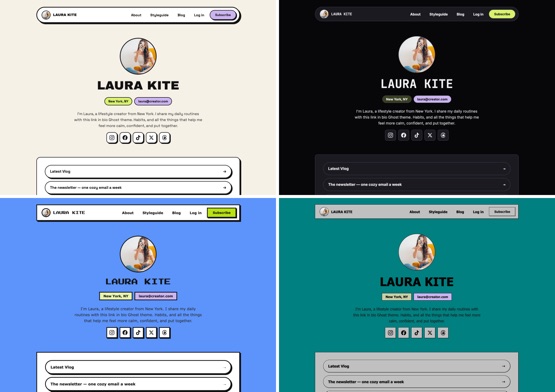
The 12 visual styles included with the Kite Ghost theme 12 visual styles, switched from theme settings.
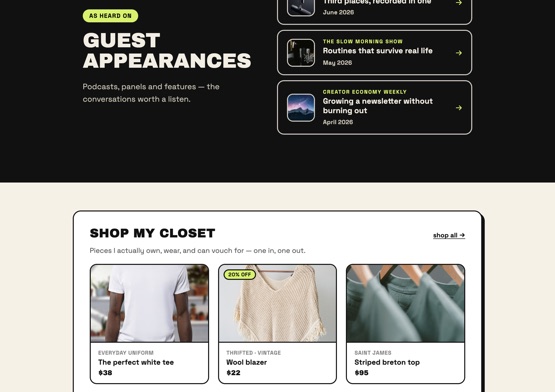
Kite homepage sections for a link in bio page The homepage sections you can switch on.
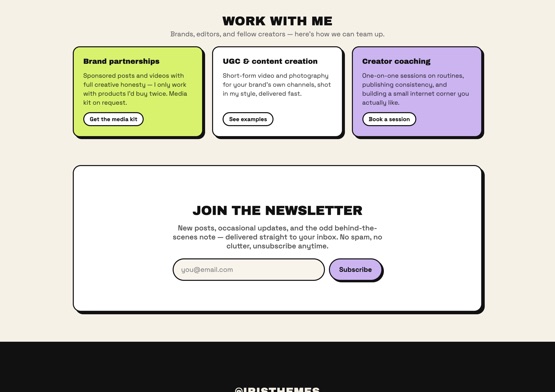
Kite newsletter and membership sections for Ghost Newsletter and membership sections.

Twelve styles, one purchase

Each is a complete look rather than a colour swap, and switching is a setting — so a rebrand does not mean buying another theme.

Neobrutalist Swiss Midnight Bubblegum Editorial Retro Web Retro OS Bitmap Glass Minimal Arcade Aqua

Specification

Price$99 one time, lifetime updates
Ghost version6.x
Current version1.0.0, July 2026
Visual styles12, switched in theme settings
Homepage sectionsProfile, newsletter, latest video, guest appearances, shop, life lately, work with me
Memberships & paid tiersYes, including paid-members-only sections
Shop sectionFor affiliate links and product picks
Styleguide pageIncluded, showing every Ghost editor card
DocumentationKite setup guide

What you get for $99

One payment, no renewal required. The same terms apply to every premium theme we sell.

Lifetime updates

Improvements and Ghost-compatibility releases come at no extra cost, for the life of the theme. Each release lists exactly which files changed.

Six months of support

Setup questions, theme settings and bug reports are covered, and you can extend to a full year during checkout. Typical reply is well inside one business day.

Written documentation

Every theme has its own setup guide covering installation, theme settings and the details specific to that theme.

A licence for one website

One theme, one site. Need more? The Annual Subscription and Lifetime Access plans cover unlimited websites and include every theme.

Translation files

All themes are translation ready, so you can run the interface in a language other than English without editing templates.

15 days to change your mind

Full refund, no questions asked. Switching themes leaves your posts untouched either way, so nothing you have published is at risk.

Moving off a hosted link page

Step one

Get a Ghost site

Ghost(Pro) or self-hosted, on your own domain. This is the part a hosted link service does for you, and the part that makes the page yours.

Step two

Upload Kite and pick a style

Upload the zip in Ghost admin, then choose one of the 12 styles. You can change your mind later without redoing anything.

Step three

Switch on the sections you need

Newsletter, shop, guest appearances, work with me. Leave the rest off — an honest three-section page beats a padded one.

Step four

Repoint the bio link

Update the link in your profiles. From then on the traffic lands on a domain you control and the signups are yours.

Questions

You need a Ghost site, either on Ghost(Pro) or self-hosted. Kite is a theme, not a hosted service, so it installs onto a Ghost site you control. That is the trade compared with a link-in-bio service: a little more setup, and the domain and audience stay yours.

Yes. All 12 styles ship in the one theme and are switched from theme settings in Ghost admin. Your content and sections stay exactly as they are, so trying a different look costs a few seconds.

The shop section is built for affiliate links and product picks, so you can point at whatever you are recommending. For selling access directly, Ghost's membership tiers let you charge for members-only content, which Kite supports. It is not a full storefront with a cart.

No. The home page is the link-in-bio layout, but the rest of Ghost is still there: posts, tags, author pages, a newsletter and member accounts. Kite also ships a styleguide page showing every Ghost editor card, so you can see how written content will look before you write it.

Yes, and it is the sensible way to do it. Build the Ghost page first, check it on a phone, then repoint the link in your profiles once you are happy. Nothing forces you to switch before the new page is ready.

It has to — nearly all link-in-bio traffic arrives from a phone. Kite is responsive throughout, and the demo is worth opening on your own phone before you buy, which is true of any theme.

Publishing something other than a link page?